| Reusable audiences let you reuse audience settings—like demographics, screeners, quotas, and confidentiality preferences—so you can quickly launch consistent, high-quality tests without starting from scratch. |
|
Product: UserTesting Experience: New |
On this page:
What is a Reusable audience?
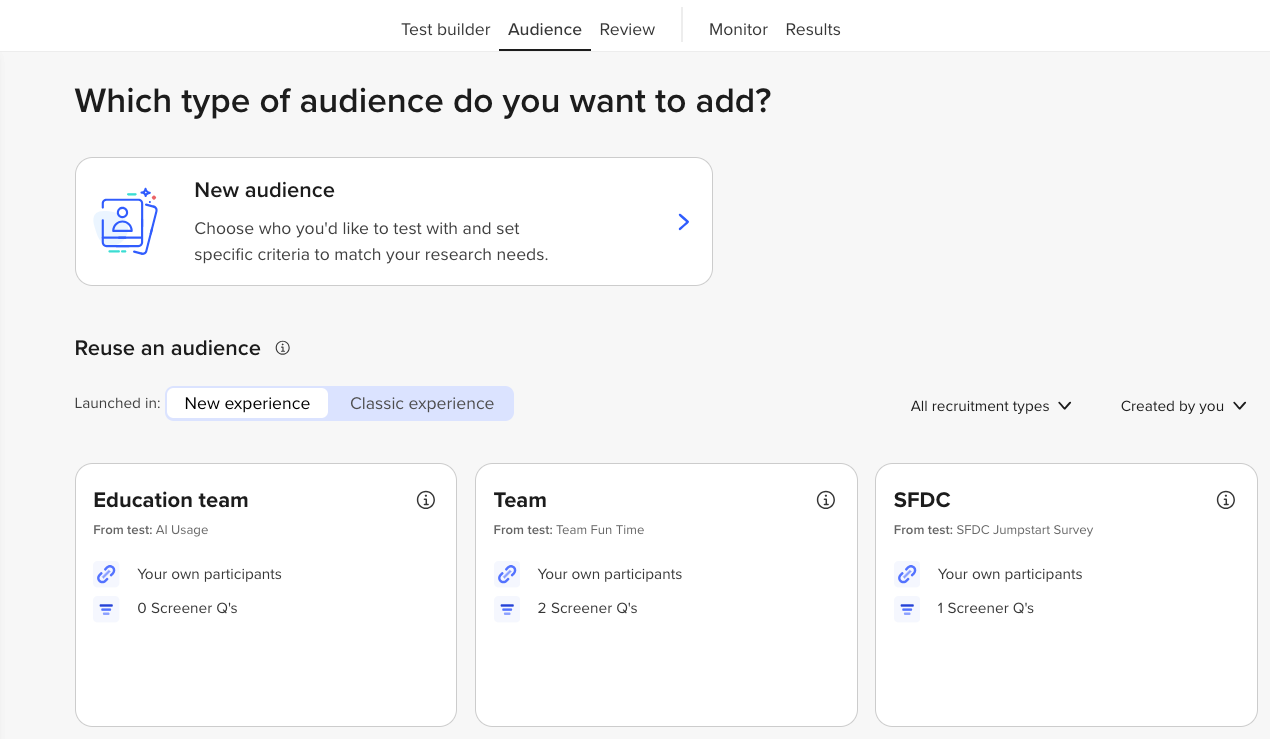
Reusable audiences let you reuse your test audience setup. This includes: demographics, screeners, quotas, and confidentiality settings.
This means:
- No more starting from scratch
- Faster test setup
- More consistent targeting across your team
Watch our video for a quick look:
Why is it helpful?
Reusable audiences are great for:
- Recurring tests: Use the same criteria again and again.
- Large teams: Keep everyone aligned on who you’re testing with.
- Non-researchers: Designers and marketers can launch tests using previously used audiences.
How to use it
- Build your audience
Create your test and set up the audience as usual: Choose demographics, add screeners, set quotas, and confidentiality. You'll start by selecting the + Add button:
Launch your test to automatically save your audience and reuse for future tests. -
Use a Reusable audience
When starting a new test:
- Click “Reuse an audience.”
- Pick the audience that matches your test goals.
- Make changes if needed, or go ahead and launch your test.
3. Manage Your Audiences
To see or update saved audiences:
- Go to your Audience Library
- From there, you can:
- View details
- Edit or rename
✅ Tip: Use clear, consistent names so your team can easily find what they need.
Favorite a Reusable audience
- Save audience criteria you use often and reuse it in future tests.
- Your commonly used audience setups are easy to find and select.
- Reusing saved criteria reduces manual setup across multiple tests.
- Using shared, saved criteria helps everyone target audiences the same way.
To Favorite a Reusable audience, follow these steps:
- Find the audience with the criteria you want to use.
- Select the star icon to Mark as favorite.
- To Unmark as favorite, select the star icon again.
To find a Favorited Reusable audience, there are two ways:
- Navigate to Audience tab.
- Under the Reuse an audience, you’ll see previously used audiences.
- Favorited audiences are shown with a filled in star.
If you have Favorite audiences, you’ll be able to filter in the dropdown to view all favorites.
Related content
|
Want to learn more? Check out these Knowledge Base articles... |
Interested in growing your skills? Check out our University courses... |
|
Need hands-on training?
|
Can't find your answer?
|